

















White Christmas — Documentation
Dress your whole storefront for the holidays — snow, lights, characters and playful touches — then turn the festive mood into sales, all from one back office.
Welcome to White Christmas
White Christmas dresses your PrestaShop storefront for the holidays — falling snow, a garland of lights, a flying Santa, playful touches as people browse — and then helps you turn that festive mood into sales. You switch it on in the back office; your shop does the rest.
Everything is controlled from a single back-office page, grouped the way you think about your shop: the look of it, the characters, the little interactions, and the selling features. Each effect has a live preview and a short explanation, so you can see what a setting does before your visitors do. Nothing is written into your theme, and when the season is over the module can switch itself off.
What it looks like
With White Christmas on, an ordinary storefront becomes a festive one without a redesign. Here is the demo shop used throughout this guide, with a handful of effects enabled:
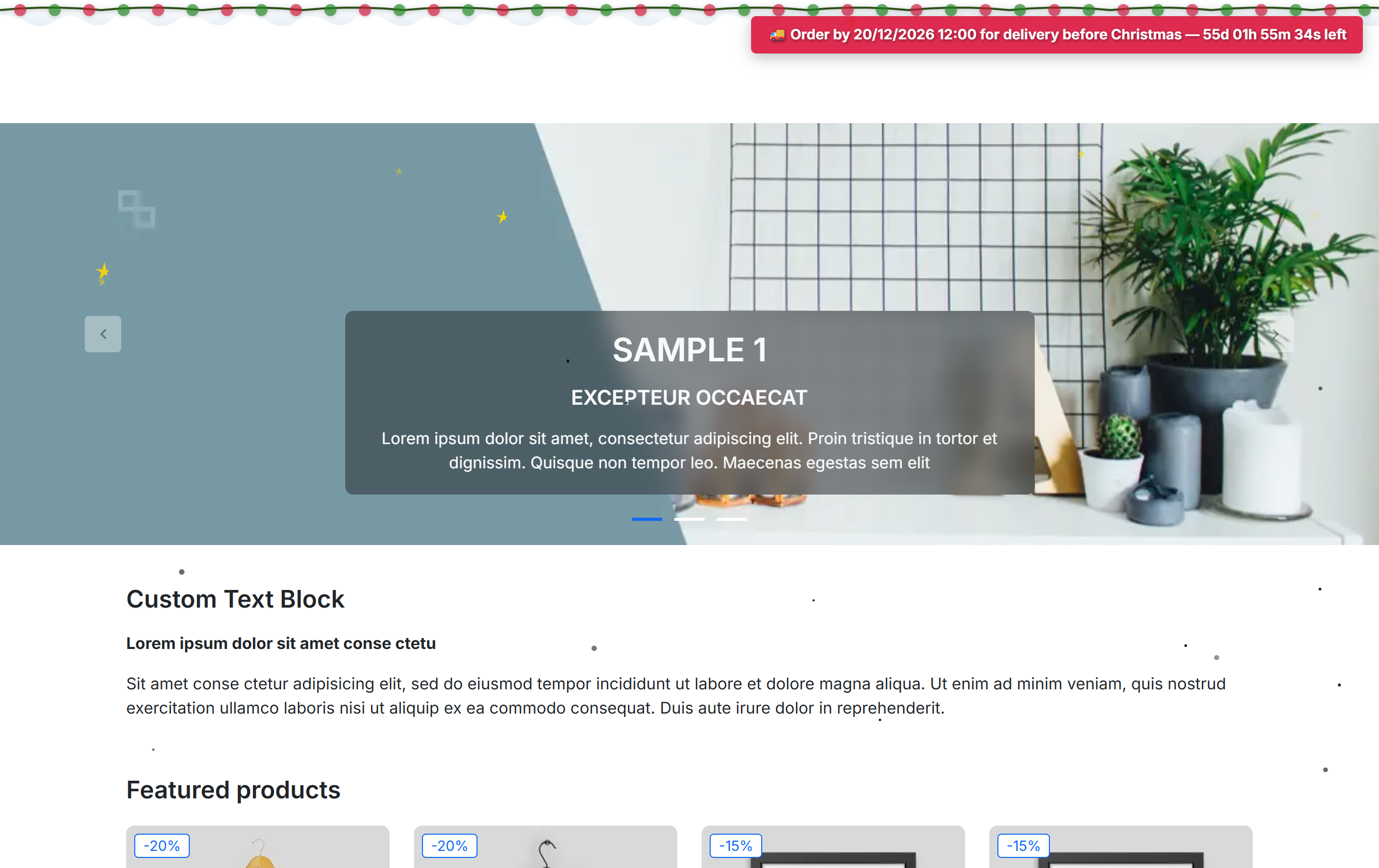
- A promotion bar with a shipping-cutoff countdown, to create urgency before the delivery deadline.
- A garland of lights across the top of the page, part of the Snow & Sky effects.
Three things it helps you do
Every feature in the module serves one of three goals.
Deck the whole shop in minutes
More than a dozen effects — body, top and header snow, stars, a lights garland, a flying Santa, a snowman, a cursor trail, falling gifts and confetti — turn on from one page. A set of palette presets recolours every effect at once, so the whole shop stays coherent.
Turn the festive mood into sales
A promotion bar counts down to your shipping cutoff; gift wrapping is offered at checkout; and a floating surprise gift reveals a discount code. These are the features that nudge the basket, not just the mood.
Fast, respectful and under control
A shared drawing engine keeps the effects light, a smaller budget runs on phones, motion respects a visitor's reduced-motion setting, and a season schedule turns the whole thing on and off by date — on in one click, off by itself in January.
How this guide is organised
The chapters follow the groups in the module, so you can read with the back office open in front of you:
- Getting started — install the module and read the dashboard (Install and first run).
- Setup — the master switch, the season schedule, palette presets, which pages show the effects, and the device matrix (Setup).
- Snow & Sky — snow, stars and lights (Snow & Sky); Characters — Santa and the snowman (Characters); Interactive — cursor trail, falling gifts and confetti (Interactive).
- Promotions — the selling features: the promotion bar, gift wrap and the surprise gift (Promotions: the selling features).
- Experience — performance, reduced motion and the visitor pause control (Experience); the dashboard and stats (Dashboard, stats and help); and FAQ & troubleshooting (FAQ and troubleshooting).